Why Vasion Customers Don’t Have To Worry About Windows Protected Print
A straight-talk guide to Microsoft's Modern Print Platform changes.


Vasion Team
January 27, 2026
7 mins
Microsoft is making significant changes to how Windows handles printing, and IT leaders have questions.
Here's what you need to know first: Vasion will support Windows Protected Print. Your printers won't stop working. You won't need to replace your fleet. And you can transition at a pace that makes sense for your organization.
Now let's talk about what's actually happening and how to think strategically about this transition.
What Is Windows Protected Print?
Windows Protected Print (WPP) is Microsoft's way of restricting printing to only their approved driverless methods. When it's enabled, traditional printer drivers can't run.
Think of it like a coffee shop going cashless. They're not stopping you from getting coffee, they're just changing how you pay for it.
WPP is part of Microsoft's broader Modern Print Platform (MPP) initiative, which is fundamentally redesigning how Windows handles printing.
The Terms You'll Keep Hearing
- Modern Print Platform (MPP): Microsoft's new printing architecture using IPP (Internet Printing Protocol)
- Windows Protected Print (WPP): The setting that blocks traditional drivers
- Printer Support App (PSA): Software that adds advanced features back (duplex, color settings, finishing options, etc.)
- IPP (Internet Printing Protocol): The standardized protocol that enables driverless printing, allowing printers and computers to communicate directly without manufacturer-specific drivers
- Mopria: Industry certification standard for driverless printing. Think "Wi-Fi Certified" but for printers.
Important distinction: This has nothing to do with Microsoft Universal Print, which is their separate cloud-based print management service. WPP is about the printing architecture itself; Universal Print is about where you manage print queues. Different products entirely.
Why Is Microsoft Really Doing This?
The Real Driver: Windows on ARM
Apple's M1/M2/M3 chips transformed the laptop market with exceptional performance and all-day battery life. Microsoft's response: Windows on ARM devices (Surface Pro X, Copilot+ PCs).
The problem: Traditional printer drivers are compiled for Intel/AMD processors and literally cannot run on ARM architecture without slow, unreliable emulation. Printing essentially doesn't work.
Microsoft's solution: Transition the entire Windows ecosystem to driverless printing (IPP), which works identically across Intel, AMD, and ARM.
This is what's driving the aggressive timeline—Microsoft needs this to compete in the modern laptop market.
The Public Story: Security
The 2021 PrintNightmare vulnerability exposed serious flaws in Windows Print Spooler. Traditional printer drivers run with system-level privileges, creating significant security risks.
Microsoft's solution: Move to driverless printing with standardized, more secure protocols.
This security benefit is real and meaningful. But ARM enablement is what's setting the timeline, which helps you understand how much flexibility you actually have.
The Timeline: What's Actually Required and When
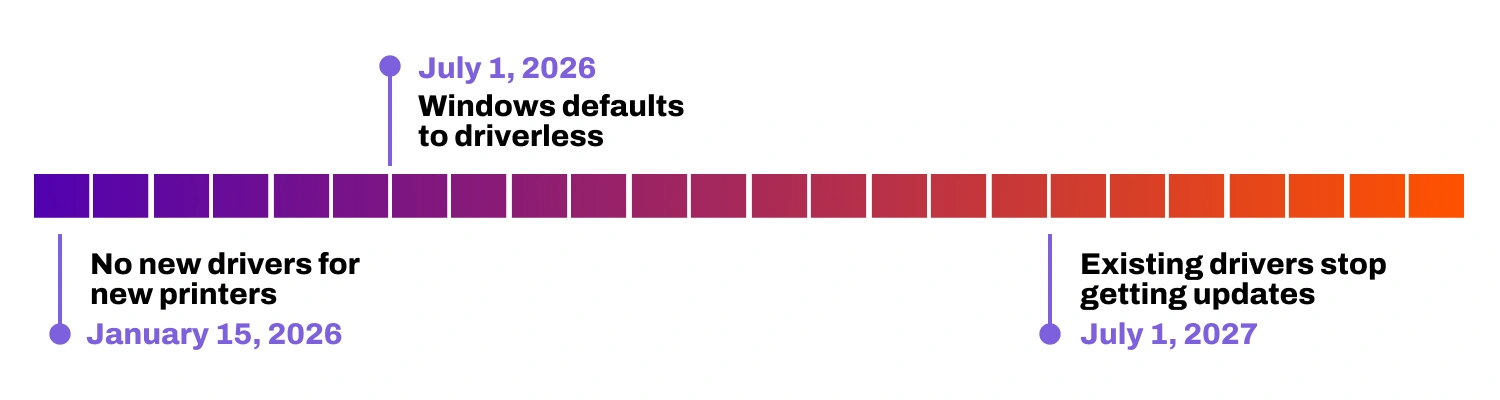
The headlines make this sound like everything breaks on a specific date. The reality is considerably more gradual.
Microsoft has published dates, but the nuances matter:
January 15, 2026: No New Drivers for New Printers
What Microsoft says: New printer models can't submit drivers to Windows Update.
What this actually means:
- Only applies to brand new printer models released after this date
- Existing models can still receive driver updates
- Manufacturers can still submit drivers for Windows 10
- Microsoft grants exceptions for specialized equipment (label printers, medical devices, etc.)
Reality check: Most printers in your current fleet aren't affected in the near term.
July 1, 2026: Windows Defaults to Driverless
What Microsoft says: Windows will prioritize driverless printing.
What this actually means:
- Windows prefers the IPP Class Driver when installing printers
- Traditional drivers still work—they're just not the default anymore
- Users can manually install traditional drivers
- IT admins can push traditional drivers via Group Policy
- WPP is optional—you can disable it if you need to
Reality check: You control the pace. This isn't a forced cutover.
July 1, 2027: Existing Drivers Stop Getting Updates
What Microsoft says: Driver updates end.
What this actually means:
- Security patches continue as long as the Windows OS version is supported
- Drivers keep working—they just won't get new features
- Microsoft has no plans to disable existing functionality
- Windows 10 support extended into late 2025 (longer with paid extended support)
Reality check: "End of updates" doesn't mean "end of working." Your drivers will function for years. They'll just be frozen at their current feature level.
The Actual Timeline
- Microsoft already adjusted these dates once based on enterprise feedback. They're listening.
- The realistic transition timeline might be closer to 3-5 years, not 1-2 years.
- You have time to plan strategically rather than scrambling.
The Real Challenge: PSA Fragmentation
Here's what deserves more attention than the deadline dates.
How Printer Support Apps Actually Work
Basic driverless printing works fine for simple jobs. But for advanced features (duplex, color management, finishing options, etc.), manufacturers create Printer Support Apps (PSAs).
Here's the catch: Each manufacturer's PSA only works with their own printers.
- HP PSA → HP printers only
- Canon PSA → Canon printers only
- Xerox PSA → Xerox printers only
- Ricoh PSA → Ricoh printers only
You get the pattern.
Why This Matters
Most enterprises have 3-8 different printer brands across their fleet.
In the PSA model, that means:
- 3-8 different PSAs to evaluate and deploy
- 3-8 different management interfaces
- 3-8 different user experiences
- 3-8 different support relationships
This is the opposite of the universal driver consolidation IT teams spent years achieving.
It's adding complexity in the name of modernization, which is exactly why architectural choices matter more than Microsoft’s transition deadlines.
What About Other Operating Systems?
Critical point: WPP and MPP only apply to Windows.
- macOS: Continues using its own printing architecture (unchanged)
- Linux: Uses CUPS printing system (unchanged)
- Chrome OS: Already uses driverless printing
- iOS/Android: Already driverless
The implication: You'll manage printing differently across platforms unless you have a unified solution.
The Mopria Question
Microsoft's MPP requires printers to be Mopria certified for full driverless functionality.
What is Mopria? Industry standard for driverless printing.
The challenge:
- Many printers 5+ years old aren't Mopria certified
- Specialized equipment may not be certified
- Budget models sometimes lack certification
Microsoft's answer: Replace them or accept limited functionality.
Better answer: Choose solutions that work with both Mopria and non-Mopria devices while you transition.
How Vasion Approaches This Transition
We've been preparing for this longer than you might think.
The 2013 Decision That Matters Now
In 2013, we made a bet that looked unconventional.
Print servers were the industry standard. Everyone had them. Every vendor built around them. Suggesting you could eliminate them entirely at enterprise scale seemed impractical.
We did it anyway.
We built direct IP printing that:
- Sends jobs straight from devices to printers
- Requires no middleware servers
- Works regardless of driver architecture
- Runs consistently on Windows, Mac, Linux, and ARM
When PrintNightmare hit in 2021, our customers were already protected because our serverless architecture eliminates the vulnerable print spooler from the equation.
Now with WPP, we're not scrambling to catch up. We've supported IPP printing on Chromebooks for over 5 years; we know the protocol works at scale. Our spring 2026 launch brings that same capability to Windows with full enterprise feature support, well ahead of Microsoft's July 2027 deadline. We're not figuring out IPP, we're delivering the complete Windows IPP experience with all the advanced features enterprises expect.
Vasion's WPP Support Timeline
Vasion will fully support Windows Protected Print starting spring 2026.
What this means for Vasion customers right now:
- Vasion customers are already protected from the PrintNightmare-class vulnerabilities WPP addresses (thanks to our serverless architecture)
- Traditional drivers work seamlessly today
- We've supported IPP on Chromebooks for 5+ years—we know the protocol works at scale
- Full Windows IPP/MPP support launches spring 2026—well before the July 2027 timeline
- Don't enable WPP yet—wait until our full IPP support is live for the smoothest experience
- Cross-platform management (Windows, Mac, Linux, ARM) works today
- Support for both Mopria and non-Mopria devices
You don't have to choose between security today and readiness for tomorrow. You get both.
FAQs About Windows Protected Print
Does Vasion support Windows Protected Print?
Full Windows IPP/MPP support launches spring 2026—well ahead of Microsoft's July 2027 deadline. We've already been running IPP successfully on Chromebooks for over 5 years, so we're not starting from scratch. Today, our serverless architecture already protects you from the security vulnerabilities WPP aims to address. We recommend waiting to enable WPP until our full Windows IPP support is live, but you can continue using traditional drivers with complete confidence during the transition.
Should I enable WPP now?
Not yet. While our serverless architecture already protects you from PrintNightmare-class vulnerabilities, we recommend waiting until our full IPP support launches in spring 2026 before enabling WPP. This gives you the best of both worlds: protection today, and a smooth transition when you're ready.
Will my printers stop working in 2026?
No. The transition is gradual. Traditional drivers work for years. You control the timeline—WPP is a setting you enable when you’re ready. It’s not automatically enforced. With Vasion, you can wait until spring 2026 when our full IPP support is available.
Do I need to replace my printers?
Not likely. Most modern printers already support driverless printing. Solutions like Vasion work with both Mopria and non-Mopria devices, protecting your existing investments.
Is this the same as Microsoft Universal Print?
No. Universal Print is a cloud-based queue management service requiring Azure AD and M365 licensing. WPP/MPP is about printing architecture—how Windows communicates with printers. Separate products.
What about Mac and Linux users?
WPP only affects Windows. Mac and Linux keep their existing architectures. Vasion manages all of them through one platform.
Can I disable WPP if needed?
Yes, it's optional. You can disable it via Group Policy. But the broader MPP transition is Microsoft's industry direction, so planning makes sense even if you delay WPP.
What about specialized printers?
This is where flexible architecture matters. Vasion supports traditional drivers during transition, works with non-Mopria devices, and integrates with manufacturer PSAs where needed. Not a one-size-fits-all approach.
How long do I really have?
A: Realistically, probably 3-5 years, not 1-2. Microsoft has already adjusted dates based on feedback. With Vasion's spring 2026 IPP launch, you'll have a full year before Microsoft's 2027 timeline.
The Question That Actually Matters
Microsoft's Modern Print Platform is a real architectural transition. The timeline is flexible. The requirements have nuance. You have time. But here's what determines whether this goes smoothly or becomes a headache:
Do you want to manage printing through multiple brand-specific systems? Or through a unified platform that works consistently everywhere?
One approach meets Microsoft’s requirements. The other positions you for sustainable print management across Windows, Mac, Linux, ARM, Mopria, non-Mopria, traditional drivers, driverless printing, and whatever comes next. We made our architectural choice in 2013 when we eliminated print servers.
We're making another clear choice now with universal IPP support.
Both decisions serve organizations through transitions like this—not just surviving them, but being ready years in advance.
Next Steps
Want to see exactly how Vasion navigates the WPP transition with unified management?
Schedule a demo—We'll walk through how our approach works across mixed printer fleets, all operating systems, various deployment scenarios, and your specific transition timeline.
Or explore these related resources: