From ERP Output to Finished Process: One Invoice's Journey


Victor Grund, VP Solutions Engineering, Vasion
September 16, 2026
6 mins
Every platform vendor claims its products work together. The claim is easy to put on a slide and hard to fake with a document. The test is simple: pick one document and follow it from the system that generated it to the process that finishes it. If the vendor's own products need a file share, an email inbox, or a third-party connector to hand that document to each other, you are looking at separate products behind a shared logo. If it never leaves the platform, the platform is real.
Let's follow one invoice.
11:42 PM: The Billing Run
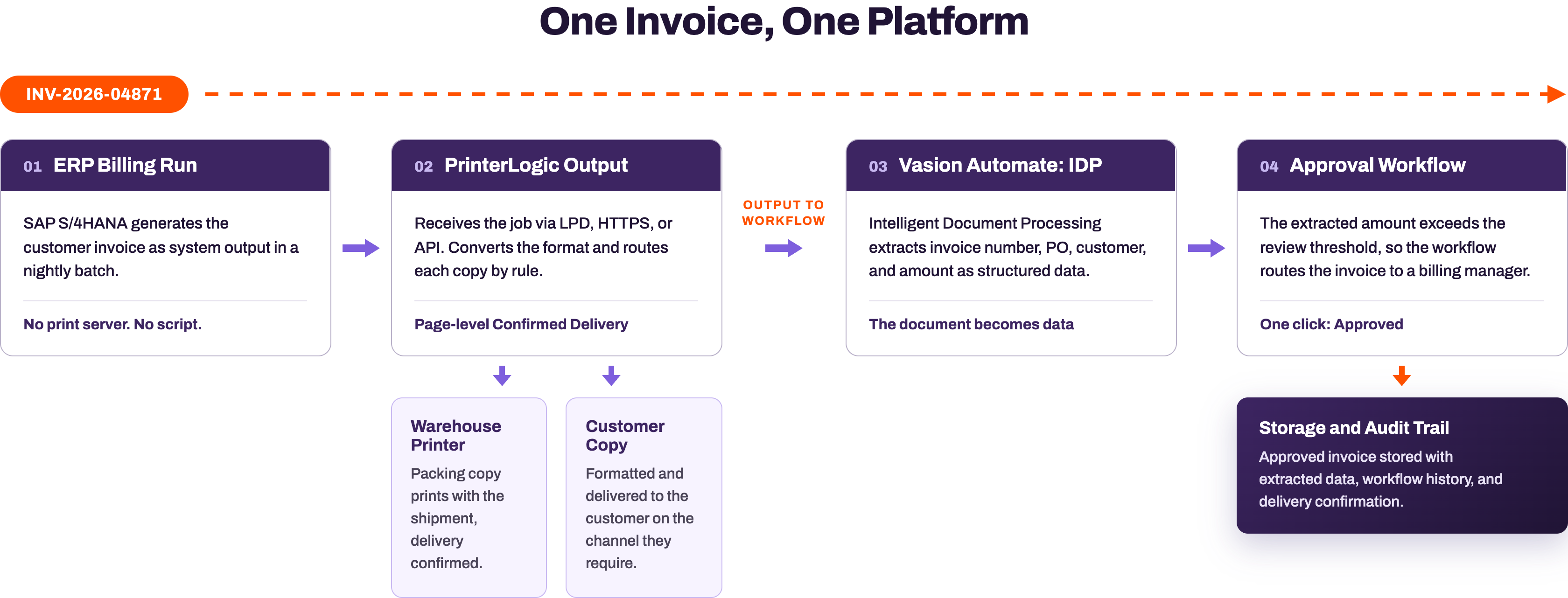
A mid-size manufacturer runs its nightly billing job in SAP S/4HANA. A few hundred invoices render as system output. One of them is INV-2026-04871: $47,820, Net 45, billed to a customer we will call Northline Manufacturing. Finance policy says any invoice over $25,000 gets a billing manager's review before it posts to the archive.
In a legacy environment, this moment is where visibility ends. The ERP hands the job to a line printer daemon (LPD) queue on a print server, a routing script decides where it goes, and nobody can say with certainty whether it arrived. Here, the queue points at PrinterLogic Output instead.
11:43 PM: The Output Layer
PrinterLogic Output receives the job the way the source system prefers: LPD or HTTPS through a Service Client for on-network systems, or an API for cloud-hosted applications. SAP environments get a certified path; Vasion holds an SAP certified integration for GROW with SAP and RISE with SAP S/4HANA Cloud. No print server sits in the middle, and no custom script decides the route.
Routing rules take over. The packing copy of INV-2026-04871 converts to the warehouse printer's format and prints beside the shipment it accompanies. The customer copy is formatted and delivered on the channel the account requires. Delivery is tracked on every job, and with Confirmed Delivery the record reflects page-level completion reported by the printer itself, not an assumption that the data arrived. When the warehouse copy lands, the record says so. In the legacy version of this story, a failed job disappears quietly and surfaces two weeks later as a customer call.
11:44 PM: The Handoff
This is the step that separates a platform from a portfolio. Output to Workflow, a capability of Output Automation, passes the invoice from PrinterLogic Output into a Vasion Automate workflow. In practice it is a routing rule: a send to workflow action fires when the job arrives, and a document event in the workflow receives the file. The document does not need to be exported to a share for another product to poll, emailed to a capture inbox, or held for a connector sync. Those patterns remain available when a process calls for them; the difference is that the platform does not depend on them to move its own documents. The same platform that delivered the invoice hands it, with its context, to the process layer.
Consider what the three-product version of this handoff looks like in many environments: the output manager writes a PDF to a network folder, a capture product watches that folder and re-OCRs a document that was born digital, and a workflow engine imports the result through a licensed connector. Three vendors, two integration points, and each integration point needs an owner, monitoring, and regression testing at every upgrade.
11:45 PM: The Document Becomes Data
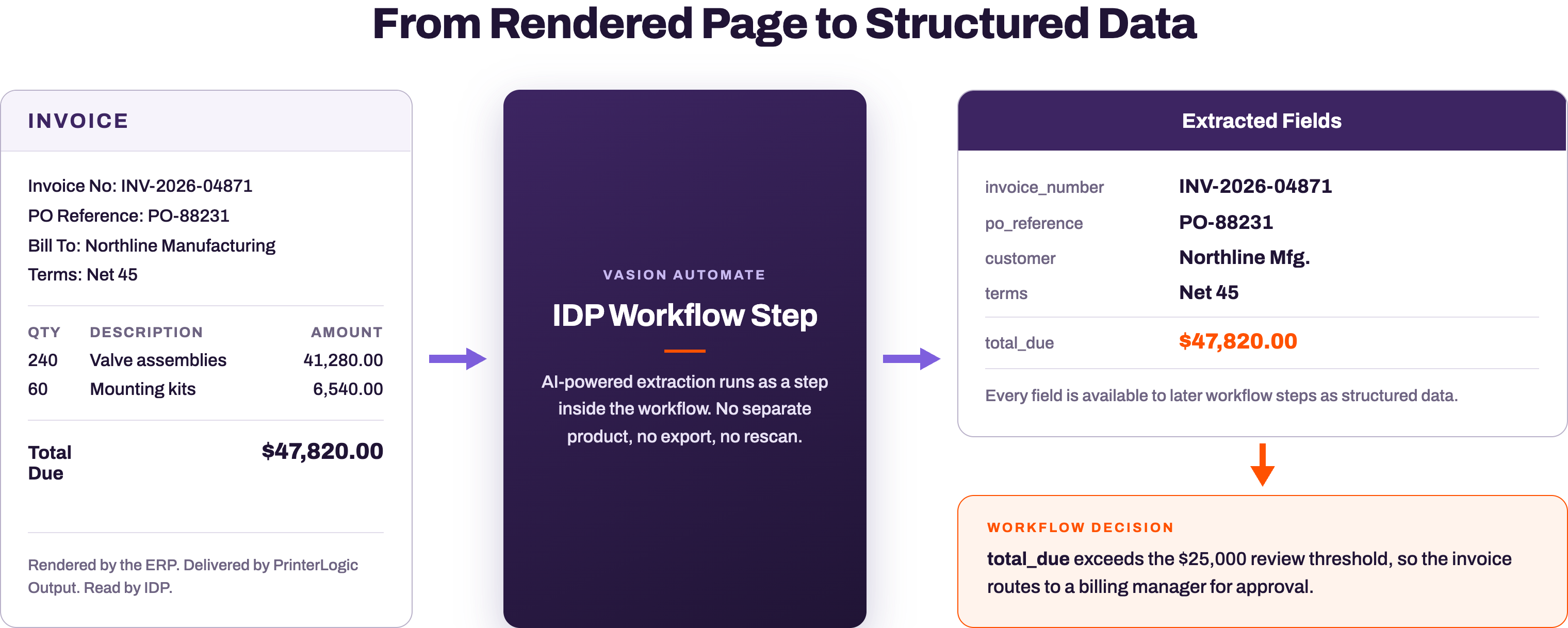
Inside the workflow, an Intelligent Document Processing (IDP) step reads the invoice. IDP is a workflow step in Vasion Automate, powered by Amazon Bedrock Data Automation, that extracts structured field data for the configured document type. For this invoice document type, it returns invoice_number, po_reference, customer, terms, and total_due as fields every later workflow step can evaluate.
Note what did not happen. Nobody printed the invoice and rescanned it. Nobody keyed $47,820 into a second system. The page the ERP rendered became data the workflow can act on, inside the same platform, seconds after delivery.
8:04 AM: The Approval
The workflow evaluated total_due overnight. $47,820 exceeds the $25,000 review threshold, so the invoice routed to the billing manager's queue while she slept. At her desk the next morning, she opens the task, sees the invoice beside its extracted fields, checks the PO reference against the order, and approves it in one click. An invoice under the threshold would have skipped her entirely and gone straight to storage.
8:07 AM: The Record
The approved invoice lands in Vasion Automate storage carrying what the workflow produced: the document itself, the extracted field data, and the approval history. PrinterLogic Output holds the delivery confirmation for the printed copies. When an auditor asks about INV-2026-04871 next year, the platform answers end to end: rendered, delivered, extracted, reviewed, and archived. No hunt across a print server log, a scan folder, and an email thread.
Why This Is One System
Count what is absent from this story. No routing script with a single owner. No watched folder between vendors. No re-OCR of a digital document. No CSV export bridging an output product to a workflow product. The invoice crossed from system output to delivered document to structured data to approved record, and every handoff happened inside the Vasion Platform. None of this closes the platform off: workflows can still deliver to third-party storage and existing systems when the process requires it.
Also count what it took to build. The routing rules, the IDP document type, and the approval workflow are configuration on the platform, not a custom integration project with its own development timeline. Services effort in a rollout like this goes toward outcomes: tuning workflows, validating extraction, and training the team, not writing and maintaining middleware between products.
That is the practical meaning of "Three products. One intelligent platform." PrinterLogic handles end-user print, PrinterLogic Output handles system-generated output, and Vasion Automate handles the workflows, forms, eSignature, and storage that finish the process. The proof is not the architecture diagram. The proof is that one invoice made the whole trip and never left.
FAQs About the Invoice Journey
What is Output to Workflow?
Output to Workflow is a capability of Output Automation that passes a document from PrinterLogic Output into a Vasion Automate workflow on the same platform. No export, file share, or third-party connector sits between the delivery layer and the process layer.
How does PrinterLogic Output receive ERP output?
On-network systems send jobs through LPD or HTTPS to a Service Client, and cloud-hosted applications connect through an API. For SAP environments, Vasion holds an SAP certified integration for GROW with SAP and RISE with SAP S/4HANA Cloud.
What does the IDP step extract?
Intelligent Document Processing is a workflow step in Vasion Automate, powered by Amazon Bedrock Data Automation, that extracts structured field data for the configured document type. Extracted fields, such as invoice number and total due, are available to every later step in the workflow.
Does the invoice journey require a custom integration project?
No. The routing rules, the IDP document type, and the approval workflow are platform configuration. Services engagement focuses on outcomes such as workflow tuning, extraction validation, and team training, not custom middleware development.

Watch Your Own Document Make the Trip
The fastest way to evaluate the claim is to test it with your own output: an invoice run, a pick ticket, a statement batch. Bring one document type and schedule a demo. We will follow it end to end, the same way this post did.