Vasion

Modernizing ERP Document Output: Paying Down Integration Debt

Warehouse worker checking shipping documents beside packaged goods
Victor Grund, VP Solutions Engineering, Vasion
September 28, 2026
6 mins
ERP modernization is on nearly every IT roadmap. SAP has set December 31, 2027 as the end of mainstream maintenance for ECC, and customers of Oracle, Infor, and Epicor face their own pressure to move to current cloud releases. Migration programs are funded, staffed, and measured at the executive level.
Yet one layer of the ERP stack routinely escapes the modernization mandate: document output. Every ERP transaction eventually becomes a document that must land somewhere, physical or digital. A pick ticket at a warehouse printer. An invoice in a customer inbox. A shipping label on a box that will not leave the dock without it. The software that moves those documents, the output manager, is often the oldest code path in the enterprise. Modernize the ERP without modernizing output, and the new system inherits the old system's most brittle dependency.

How Output Managers Became Integration Debt

Legacy output managers earned their install base. Products in this category trace their lineage to the mainframe and client-server eras, and they solved hard problems: capturing spool output from enterprise applications, converting documents between printer languages, and guaranteeing delivery of mission-critical jobs. Decades later, many of those deployments still work. That is precisely the problem.
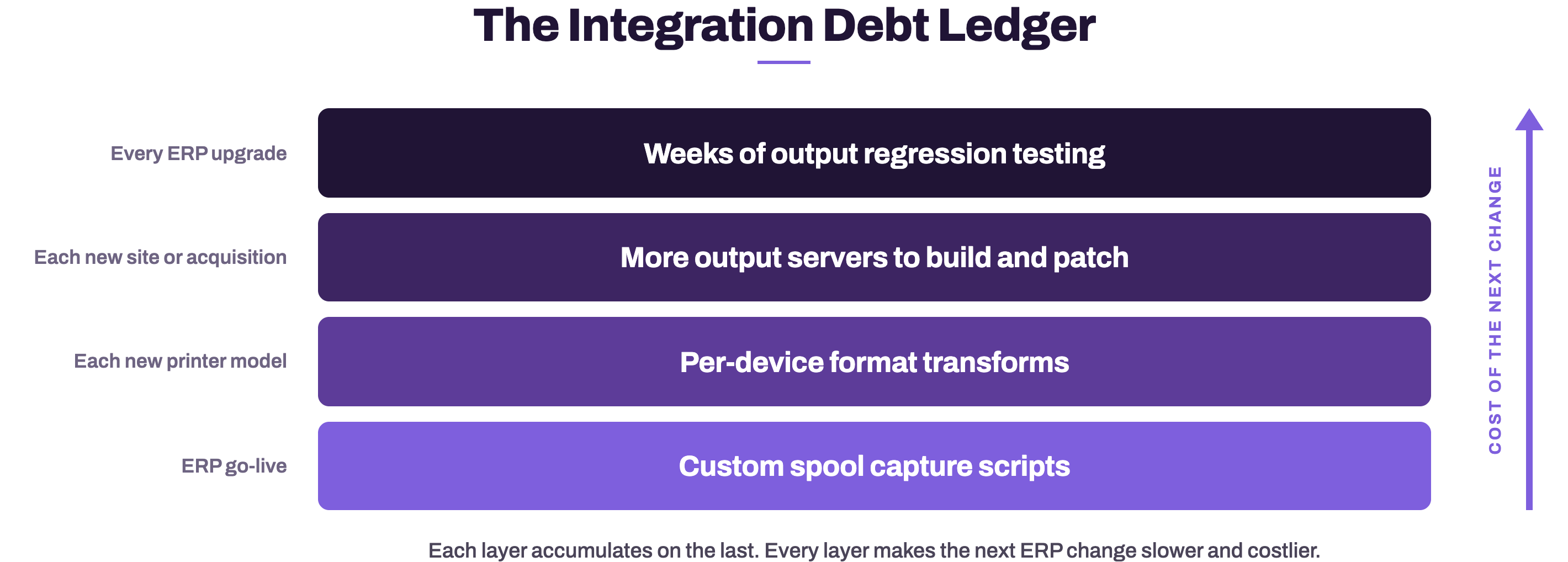
Each integration was built as a point solution. A script captures spool files from the ERP. A transform converts them per printer model: PCL here, PostScript there, ZPL for the label printers. A queue definition binds each document type to each device. A server, or a cluster of servers, hosts all of it at each site. Every one of those artifacts solved a real problem on the day it was created. Every one of them also became a dependency that must be found, understood, and retested each time the ERP changes.
That is integration debt: the accumulated cost of point fixes that make every future change slower and more expensive. It compounds quietly. In many environments, the routing scripts have a single owner, and that person is nearing retirement. The ERP upgrade plan carries a line item for output regression testing measured in weeks. The server count grows with every acquisition and every new site, because scaling means installing more infrastructure.
Licensing models deepen the debt. Legacy output managers are commonly licensed per device or per server, with implementations that run for months and lean heavily on professional services. Several vendors now market cloud editions, but many of these move the same server software into a hosted private cloud. The infrastructure did not disappear; it changed its billing address. Lift-and-shift is not cloud-native, and it retires none of the debt.

What the Debt Costs at ERP Migration Time

Integration debt presents its bill at the worst possible moment: mid-migration. Organizations moving to S/4HANA or another cloud ERP discover that output is a critical-path item. Custom spool integrations built for the old ERP do not carry forward cleanly. Every routing rule, transform, and queue must be inventoried, mapped, and retested against the new system. Teams that budgeted for a data and process migration find themselves also funding an output rebuild they never scoped.
The steady-state costs continue between migrations. Output servers must be patched, monitored, backed up, and made highly available, and the staff hours spent on that work produce no new business value. Operational risk concentrates in this layer as well: when a warehouse label printer stops, shipping stops, and when the fix requires someone who understands a decades-old scripting environment, minutes become hours.
Security review is the quiet cost. Every server in the output path is an attack surface the security team must assess, and a vendor with a thin certification portfolio pushes that assessment work onto the customer.

What a Cloud-Native Replacement Looks Like

A cloud-native replacement is not the old architecture hosted somewhere else. It changes the shape of the problem. Five properties distinguish it.
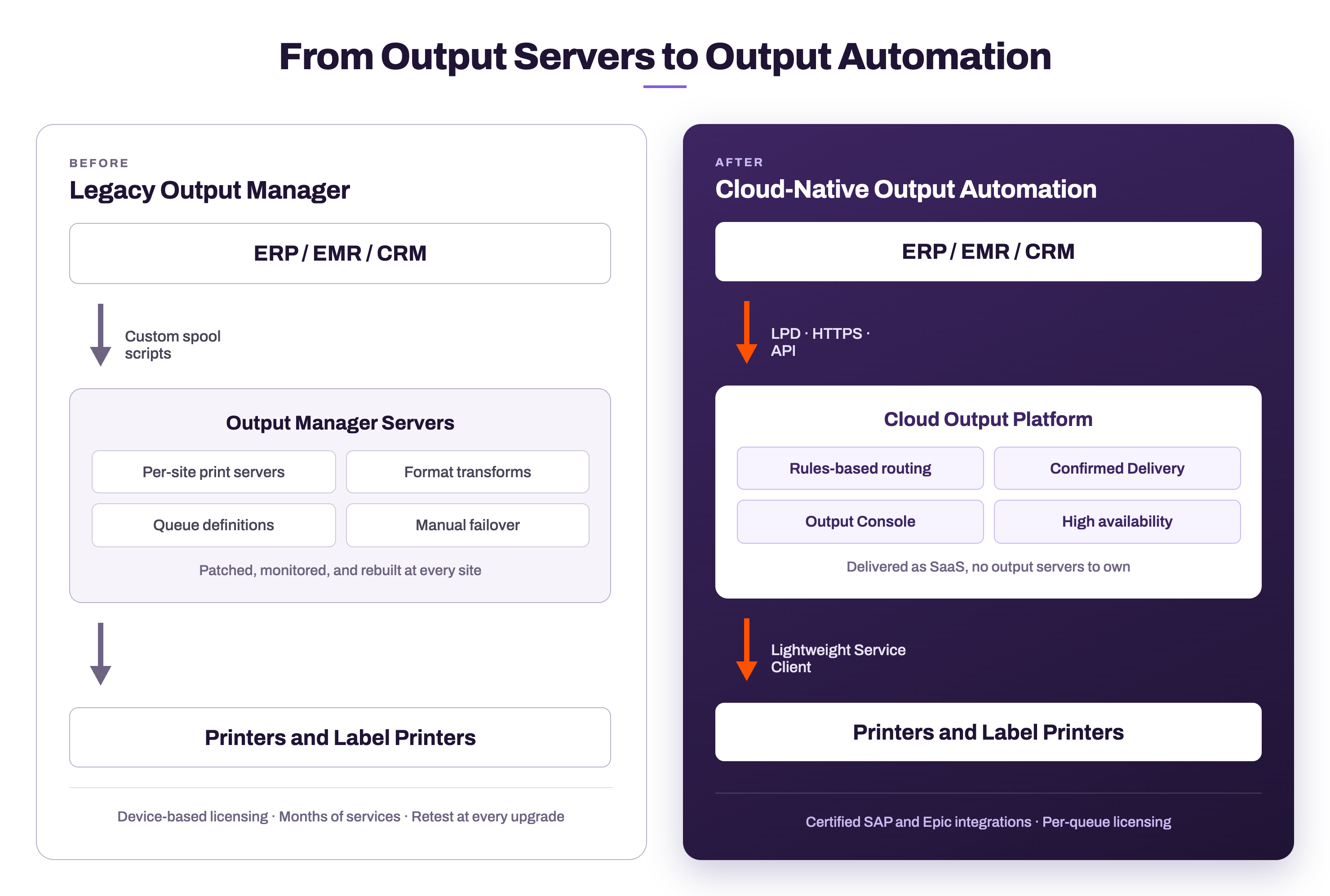
First, there is no output infrastructure to own. Documents enter the platform through standard protocols, LPD or HTTPS, or through APIs for applications that never speak print protocols at all. A lightweight service agent replaces the server fleet, and the platform handles queueing, conversion, high availability, and failover.
Second, certified integrations replace custom scripts. The connection to the ERP should be a supported, certified product capability, not an artifact one engineer built in 2011. Certification matters because it survives upgrades: when the ERP vendor changes an interface, keeping the integration current is the output vendor's obligation, not an internal archaeology project.
Third, rules take the place of code. Routing logic belongs in an administrative console as triggers, conditions, and actions that any administrator can read, audit, and change. When routing is configuration rather than code, the single point of human failure disappears.
Fourth, delivery becomes something you can prove. Bidirectional communication with the printer, page-level failure detail, and a complete audit trail turn “did it print?” from a phone call into a query. In regulated industries, that audit trail is the difference between an incident and a finding.
Fifth, compliance is inherited from the platform. When the output platform arrives with FedRAMP® Class D Certification, ISO 27001, ISO 42001, and SOC 2 Type II, the security review shrinks from months of assessment to a checklist.
Questions to Ask Before the Next ERP Milestone
A quick diagnostic shows whether an output layer is paying dividends or accruing interest.
  1. How many servers sit between the ERP and the printers, and what does each one cost to run annually?
  2. How much of the last ERP upgrade budget went to output regression testing, and who did that work?
  3. Can any administrator read and change document routing, or does it live in scripts one person understands?
  4. Can the team prove delivery of a specific document to a specific printer, down to the page?
  5. Does the output vendor's certification portfolio shorten the security review, or lengthen it?
If the answers point to server counts, script owners, and retest weeks, the output layer carries integration debt, and every ERP milestone will pay interest on it until the principal is retired.


Where Vasion Fits

PrinterLogic Output is the Output Automation product on the Vasion Platform, and it was built cloud-native rather than migrated there. Documents arrive from ERP, EMR, and CRM systems over LPD, IPPS, or HTTPS. Rules-based routing directs them using triggers, conditions, and actions defined in the console. Confirmed Delivery reports job status back from the printer in real time, down to the page where a job failed. Label output converts automatically, including ZPL for high-volume label printers. The Output Console gives administrators one view to track, redirect, reprint, or cancel any job without touching the source application.
Vasion holds an SAP certified integration for GROW with SAP and RISE with SAP S/4HANA Cloud, integrates with Epic, and backs the platform with FedRAMP Class D Certification, ISO 27001, ISO 42001, and SOC 2 Type II. Licensing is per print queue, and there are no output servers to buy, patch, or retire later.
ERP modernization is already funded. Extending it one layer down, to the documents the ERP exists to produce, is how the program finishes the job. Do not let output become the critical-path surprise of the next migration: schedule a demo and watch PrinterLogic Output move a job from ERP to printer, confirmed and audited, with no output servers in the middle.