whitepaper
From Output Management to Output Automation
Transform Your Healthcare Organization
Introduction
If you manage IT Infrastructure at a hospital or health system, this is likely your reality. Every patient wristband, lab label, medication order, and discharge instruction your EHR generates travels through a routing environment that your team manages often inherited from whoever built it years ago.
When it works, nobody notices. When it fails, operations stop and your phone rings. And because the environment is fragile, your team has learned not to touch it unless something breaks.
PrinterLogic Output replaces this inherited infrastructure with a cloud-native platform that connects directly to Epic and Oracle Health (Cerner), routes every job with rules-based automation, confirms delivery on every critical document, and produces a complete exportable audit trail—deployed alongside your existing environment, on your timeline.

“The EHR output environment is the most fragile thing I manage.”
1
The Problem You Inherited
Healthcare organizations have invested heavily in their EHR systems. What often gets overlooked is how data flows out of those systems into mission-critical printing: patient wristbands, lab labels, medication orders, discharge instructions, and prescription documents. The infrastructure managing that handoff has been left largely unchanged for a decade.
Legacy output management systems require dedicated, redundant, on-premise servers managed by a specialized team—separate from the servers handling end user printing. The result is a fragmented environment with compounding costs, compliance exposure, and a level of institutional fragility that is difficult to surface until something fails.

No Audit Trail
Legacy systems cannot produce a complete, timestamped record of every document your EHR sent to a printer. When a compliance auditor asks, the answer is a manual reconstruction—if it is possible at all.

One Person Deep
The institutional knowledge required to manage legacy output routing often lives with one or two people. If they leave, recovery from even a minor failure becomes slow, expensive, and uncertain.

Disconnected From IT
End user printing is managed by a different team under a different director. Two teams, two systems, two consoles, no shared reporting. The CIO sees neither side clearly.

No Automated Failover
When a printer fails or a server goes down, print jobs stop. There is no automatic rerouting, no alerting, and no recovery without manual intervention. In a clinical environment, that delay has operational consequences.

Compliance Exposure
HIPAA Security Rule updates require mandatory encryption of all ePHI in transit and at rest, complete audit trails, and annual technology inventories. Legacy output environments fail all three requirements.

Expensive to Maintain
Dedicated on-premise servers, separate licensing, and specialized management overhead make legacy output management one of the most expensive per-function line items in healthcare IT infrastructure.
“In the past year, the average cost of a print-related data breach in healthcare was $1.28M.”
Source: Quocirca Print Security Landscape 2024
2
How PrinterLogic Output Works
Unlike legacy output management systems that depend on resource-intensive, on-premise servers, PrinterLogic Output uses a lightweight, self-updating service that runs on your network to process and route print jobs from your EMR system. Complex logic processing and rule execution happen in the cloud. Print traffic stays localized and secure within your network.
This multi-tenant SaaS architecture supports seamless updates and scalability without burdening your local IT infrastructure. There are no manual patches, no server maintenance windows, and no single points of failure. If one service client becomes unavailable, a redundant client takes over automatically—with no interruption to print delivery.
This multi-tenant SaaS architecture supports seamless updates and scalability without burdening your local IT infrastructure. There are no manual patches, no server maintenance windows, and no single points of failure. If one service client becomes unavailable, a redundant client takes over automatically—with no interruption to print delivery.
How a Print Job Flows Through PrinterLogic Output
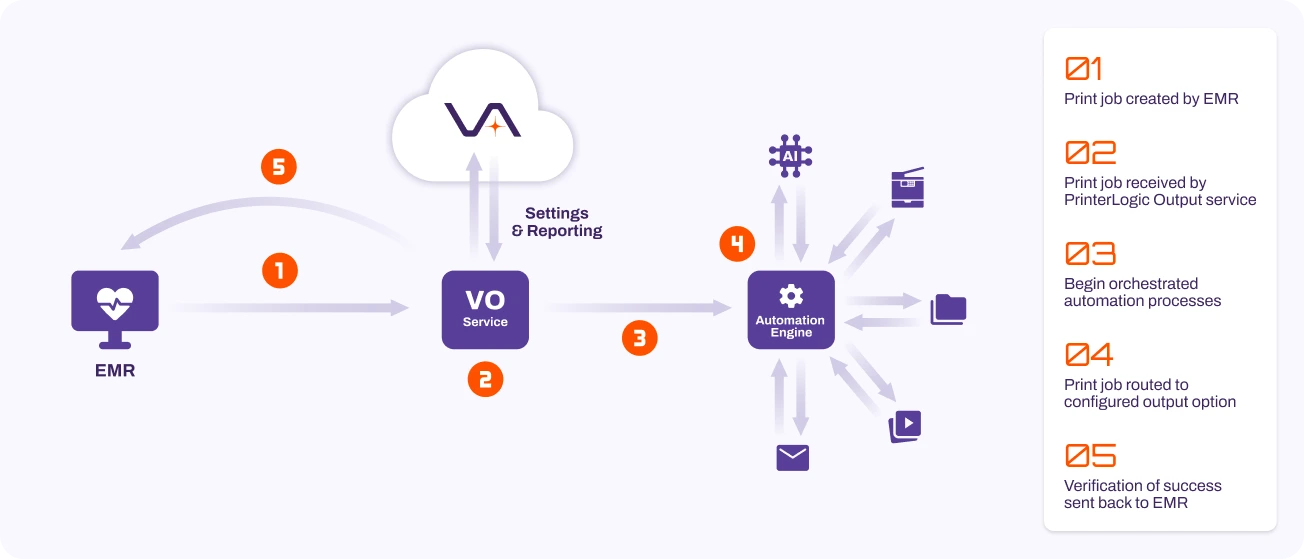 PrinterLogic Output also unifies end user printing and EMR printing into a single platform. Your team manages both from one console—not two separate systems under two separate directors. Reporting, configuration, and audit trails cover both environments under one business associate agreement (BAA).
3
A No-Code Rules & Routing Engine
By connecting the no-code Vasion Automate workflow engine, PrinterLogic Output ensures that all print jobs follow the automation rules you have configured for each print job. No custom scripting. No developer resources. No inherited code that only one person understands.
Automatic Redirection
Ensures print jobs are never held up due to printer failures or downtime.

Print Prevention
Restrict the ability to print specific documents or information and protect sensitive information.

Duplicate Delivery
Distribute print jobs across multiple locations and have the same file printed on multiple printers.

Round Robin Printing
Enable faster high-volume printing for increased efficiency or cost management.
User Reassignment
Reassign the printing of a job to another end user.

Set Paper Tray
Specify which documents should use a particular tray, overriding what was received from the backend system.

Document Archiving
Automatically store a copy of the print job in a digital storage folder.

Custom Workflows
Using the Vasion Automate workflow engine, you can create your own custom rules, routes, and workflows.
4
Unparalleled Security
PrinterLogic Output is built on the cloud-native, highly available, fully immutable, AWS Well-Architected multi-tenant infrastructure of the Vasion Automation Platform, with certified security. It is designed to protect sensitive information and ensure that only authorized personnel have access. The key aspects of Vasion security include:
Zero Trust Architecture
Vasion employs a Zero Trust model, ensuring that every user and device is authenticated and authorized before gaining access. This model includes the use of Identity Providers (IdPs) for multi-factor authentication, enhancing the security of print automation and preventing unauthorized access.
Off-Network Printing
Safely send encrypted print traffic across the internet to affiliate or remote clinics without the need for a VPN.
Secure Release Printing
Prevent HIPAA breaches by ensuring documents containing PHI are printed only when an authorized user is present and authenticated at the printer. This prevents confidential documents from being left unattended.
Compliance and Auditing
Vasion is compliant with ISO 27001:2022 and SOC 2 Type 2, and is progressing toward FedRAMP High compliance, featuring comprehensive auditing and tracking capabilities. These features help healthcare organizations maintain compliance with regulatory requirements and provide a clear audit trail for all activities.
End-to-End Data Protection
Vasion secures data in transit using TLS encryption and at rest with AES 256 encryption. This end-to-end protection ensures that sensitive information is safeguarded both during transmission and when stored.
Role-Based Actions
Granular and customizable permission and access profiles can be created, allowing users or groups to be restricted. This gives complete control to adhere to your security policies.
FedRAMP Certified, Class D. ISO 27001:2022. ISO 42001:2023. SOC 2 Type 2. No direct competitor holds this security credential stack.
5
Epic Integration Overview
PrinterLogic Output integrates with the Epic system through its Output Management API. Epic begins by creating a print job using the Epic Print Service. Administrators can configure the system to handle print jobs in one of two ways:
1. Send the job to a print server: The job is spooled, rendered by a driver, and then forwarded to the printer.
2. Send the job to a pre-configured output system like VO.
In the second scenario, VO’s Epic Connector is used. Instead of rendering and printing the job through the print server, the Output Service directly receives and routes the job to the printer.
How the Epic Integration Works
An Epic administrator sets a URL for routing print jobs, and the Epic Print Service converts the document into a PDF, XPS, or text file. This job is then encrypted and forwarded over HTTPS to the designated PrinterLogic Output URL. Optionally, the job can first pass through a customer’s load balancer to distribute it to multiple redundant Output service clients, thereby preventing single points of failure.
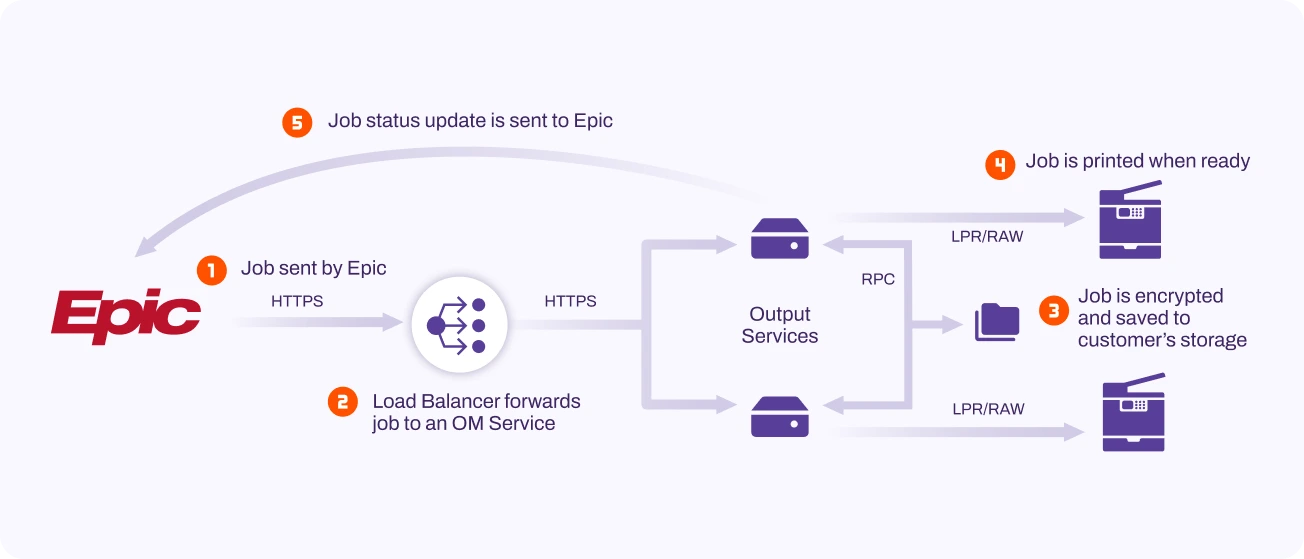 The PrinterLogic Output Epic Connector receives the job, analyzes the metadata, and temporarily stores a copy in the customer’s shared storage for high availability. The PrinterLogic Output service examines the XML file included with the print job to obtain details about the destination printer, the user who initiated the job, print settings, and other relevant metadata for job delivery and reporting. If a service client fails during processing or holding of the print job, a redundant service client takes over.
Print jobs sent via direct IP printing are immediately forwarded to the printer. For Secure Release Printing or Off-Network Printing, the job is held on the service client until the user authenticates at the printer, at which point it is released and printed. Any stored redundancy data is then deleted.
6
Oracle Health Integration Overview
The PrinterLogic Output service client receives print jobs via the Line Printer Remote (LPR) protocol from Oracle Health-hosted print queues. These queues are directed to the IP address of the PrinterLogic Output service client(s) running the Line Printer Daemon (LPD) service. If a load balancer is used in the organization’s environment, it redirects the print job to an available service client, helping to distribute print traffic more evenly across the network.
How the Oracle Health Integration Works
When the LPD Service receives a print job, it examines the metadata to identify the user who originated the job and its intended destination printer. The job is then printed either via direct IP printing or held and released at a networked printer using Secure Release Printing over RAW, IPP, or LPR protocols. For printers at affiliate clinics, the job is processed using Off-Network Printing over port 443.
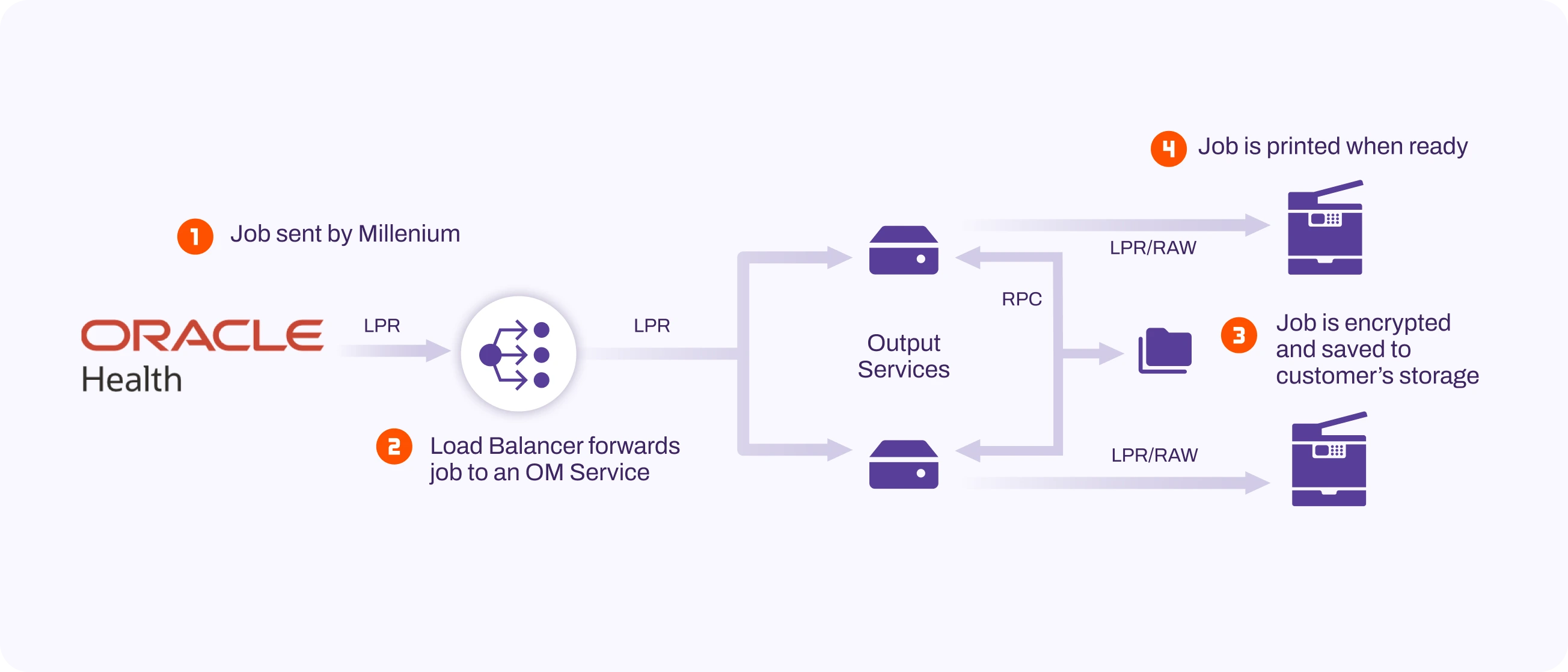 PrinterLogic Output also provides administrators with enhanced control over print queue changes in the event of print failures. Administrators can quickly redirect the IP address of the service client to a new print queue to recover from failures, without needing to contact Oracle Health for support.
7
End-to-End Processing
By connecting the no-code PrinterLogic Output workflow engine, PrinterLogic Output ensures that all print jobs follow the automation rules you have configured for each print job. No custom scripting. No developer resources. No inherited code that only one person understands.
PrinterLogic Output provides all the necessary tools to ensure the proper delivery of output from systems like Epic, Oracle Health, and others, tracking documents from start to finish, regardless of their destination. There are three main stages in processing output: receiving, processing, and reporting.
Receiving Output
When first receiving output from an EMR or other system, the PrinterLogic Output service client supports two methods: the API Print Service and the LPD Service.
API Print Service:
Supports Epic and any other service that can submit print jobs via HTTPS. When Epic submits a file using its output API, it sends the file to VO via a POST request, accompanied by an XML file containing metadata. This metadata specifies the destination printer, the user associated with the job, the number of copies, and any finishing options. VO uses this information to process the file as it enters the workflow.
LPD Service:
Supports Oracle Health and any other application capable of submitting print jobs via LPR. The LPD Service receives files using the LPR protocol and uses the “queue” field in the LPR print data to determine the job’s destination queue, the user who submitted the job, and associated metadata. This information is used by PrinterLogic Output to process the file. In both cases, a load balancer may be employed to distribute output traffic across redundant PrinterLogic Output service clients, ensuring high availability and balanced processing.
Processing
After a file is received by either the LPD or API Print Services, it enters a workflow for processing. Once the destination queue is identified, the system checks for any additional settings, such as whether the job should be securely held, sent off-network, or if it is part of an automated process that needs to be forwarded to an appropriate Vasion Automate service. Once the file is forwarded to a printer, email address, or workflow, or otherwise confirmed as delivered to its destination, the process moves to the reporting stage. Additionally, the job is encrypted and saved to customer-hosted shared storage. If the original PrinterLogic Output service client becomes unavailable, a redundant service client can access the file from storage to continue processing the job.
Reporting
After the output reaches its final destination, a report is sent back to the EMR detailing the status of the job, where applicable. Additionally, Vasion’s reporting tools allow you to review the entire environment’s activity, including which jobs succeeded or failed. You can also use these tools to reprint or redirect jobs after they have been processed.
8
Make the Case to Your CIO
Your Director of IT counterpart is already building the business case for eliminating print servers on the end user side. When you bring PrinterLogic Output to the CIO alongside that conversation, it becomes a vendor consolidation story—one platform, one console, one audit trail, one BAA covering the entire document environment.
Answers to the Questions You Will Hear:
Will This Disrupt Our EHR Workflows?
No. PrinterLogic Output runs alongside your existing legacy environment. One department at a time, on your timeline. Your legacy output servers stay live until your team is confident. Then they are retired. Clinical staff experience no disruption.
What Happens When We Acquire a New Facility?
You add it to your existing environment from a single console. No new output management server to stand up. No on-site IT deployment. No additional licensing per location.
If a Compliance Auditor Asked for a Full Document Trail Today, Could You Produce It?
With PrinterLogic Output, yes. Every job is tracked from EMR to destination, with a complete exportable audit trail. With your current legacy system, the honest answer for most organizations is no.
How Long Does Deployment Take?
PrinterLogic Output deploys in days to weeks for most environments, not months. Fewer than one percent of customers ever need paid professional services after deployment.
99.9%
Platform uptime with automatic failover and confirmed delivery on every job
Source: Vasion
1.28M
Average cost of print-related data breach last year
Source: Vasion
200%
Average ROI reported by Vasion customers
Source: Vasion
Ready to prepare your org for the future?