How do I move from paper to digital workflows?
Start small. Look at where paper slows you down—like approvals, signatures, or document storage. Then, swap those steps for digital tools that make life easier, such as eSignature platforms, cloud storage, and workflow automation. Get buy-in from your team by highlighting the time saved and reduction in daily hassles. Don’t try to go completely paper-free overnight. Focus on building smarter, faster processes one step at a time.
Is print really dead in 2026?
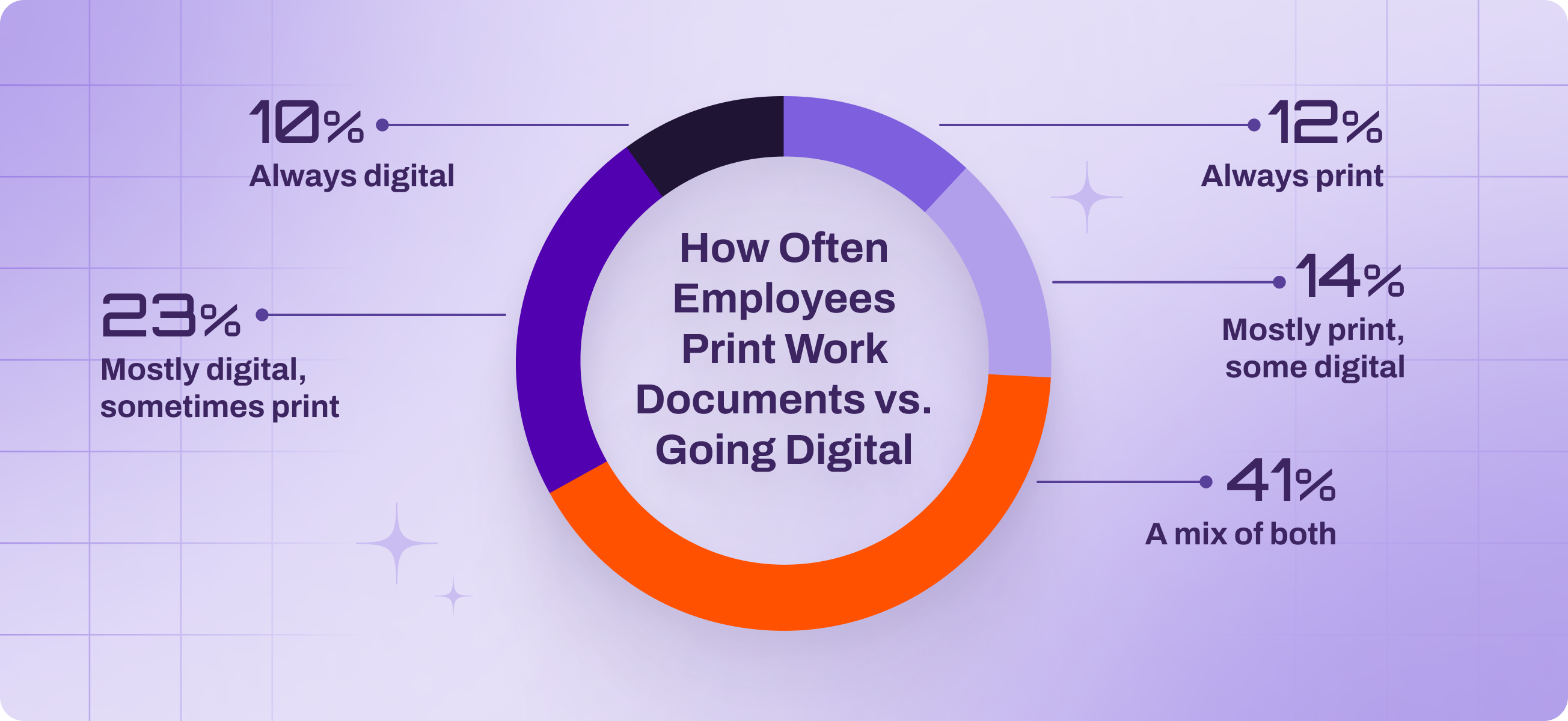
Certainly not—print is still alive and well. While digital is the default for many workflows, print still plays a key role, especially in industries like healthcare, education, and legal. The reality is that most people are using a mix of both, depending on the task. So no, print isn’t dead—it’s just evolving, and it’s part of the hybrid office reality for most teams in 2026.
What are the advantages of a paperless office?
The switch to a paperless office means fewer filing cabinets, faster workflows, and less wasted time hunting for documents. With features like remote access, it gives you more flexibility, better security, and big savings on supplies and storage. Plus, it’s easier to keep things organized and compliant when everything’s digital. Ultimately, it allows teams to focus on the work that matters instead of chasing down paperwork.
What is paperless office software?
Paperless office software is all the technology that helps you minimize paper without losing productivity—tools like document scanners, digital signature apps, cloud storage, and document workflow automation platforms. Paperless office software makes it easy to create, share, sign, and store documents digitally. It empowers teams to work faster, collaborate from anywhere, and stay organized without stacks of paper cluttering the desk.
How do I make my office paperless?
First, figure out where paper is still showing up in your office. Look at what’s being printed and why—and who is doing the bulk of the printing. From there, start digitizing. Scan what you can, switch to eSignatures, and store everything securely in the cloud. Automate repeatable tasks like approvals or form routing to save time. Don’t forget about permissions and version control to keep everything safe. Finally, track your progress. Monitor how much paper you’re saving and celebrate the small wins. Focus on sustainable, steady progress toward a smarter, more efficient workflow.