
The Scan-Back Loop: The Workflow Everyone Runs and Nobody Designed


Victor Grund, VP Solutions Engineering, Vasion
August 31, 2026
5 mins
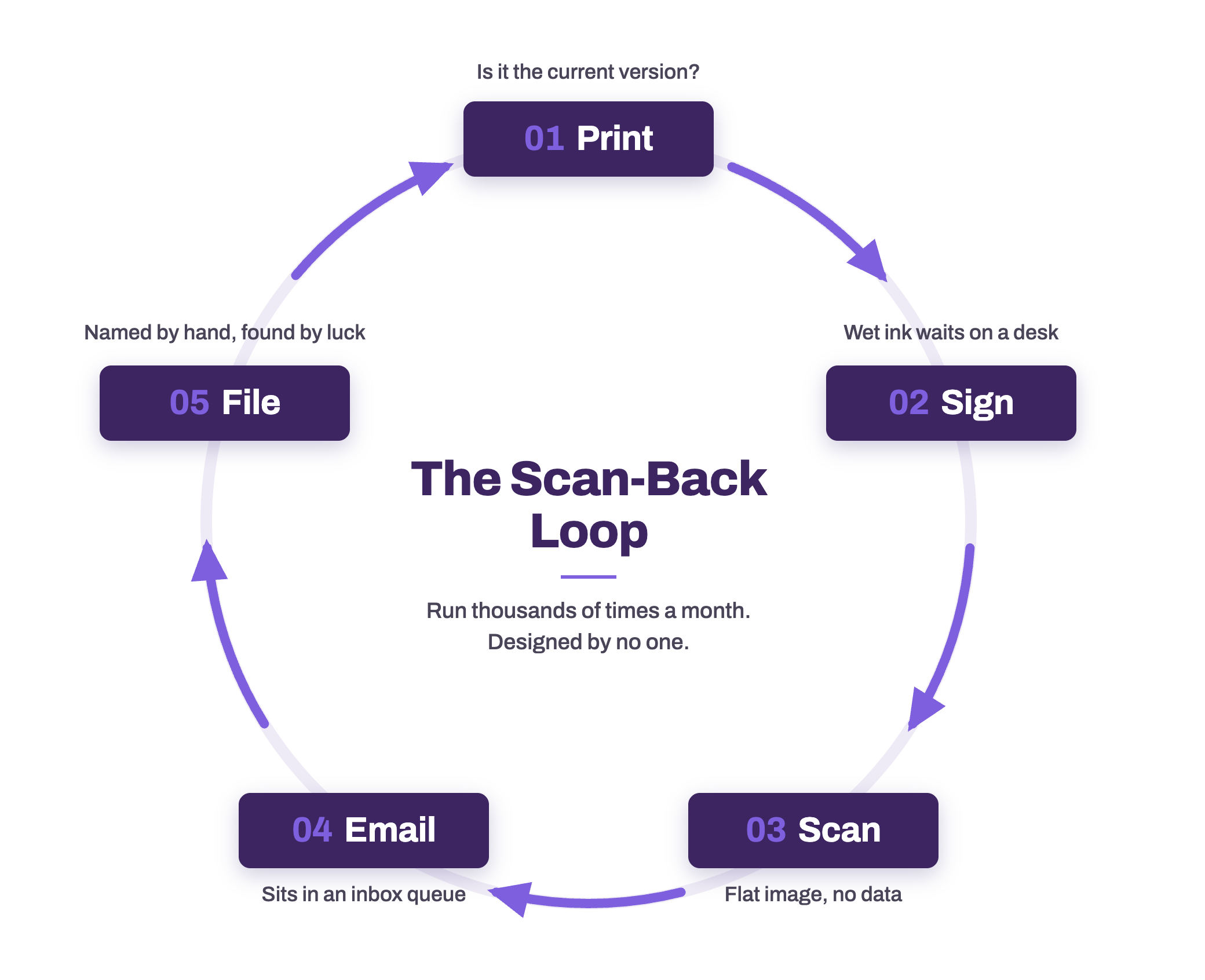
Somewhere in your organization today, a document made this trip: printed from an application, signed at a desk, carried to a multifunction printer (MFP), scanned to email, and dragged into a shared drive by someone hoping the filename still makes sense in six months. Nobody calls that a workflow. No process owner drew it, nobody gave it an SLA, and it appears on no architecture diagram. It deserves a name: the scan-back loop. A document leaves a digital system, spends a day or two as paper, and returns as a worse digital object than the one that produced it.
Run once, this loop is a minor annoyance. Run thousands of times a month across HR packets, consent forms, purchase approvals, and vendor agreements, it becomes one of the largest unmanaged processes in the business. And the paper feeding it is not going away. In the 2025 AIIM and Deep Analysis Market Momentum Index survey of more than 600 enterprises, 61% of document processes still include paper, and 48% of respondents expect paper volumes to grow.
Anatomy of the Loop
Each step looks harmless. Together they compound.Print. A blank form comes out of a tray. Whether it is the current revision depends on who saved which copy where, and version drift stays invisible until an outdated form gets processed.
Sign. Wet ink means the document now moves at walking speed. It waits on desks, travels between buildings, and disappears into interoffice mail. Learning its status requires a phone call.
Scan. The MFP converts the signed page into a flat image. Every field someone typed is now pixels. The structured data that existed before the Print step must be re-keyed to become data again.
Email. The scan lands in an inbox as an attachment named Scan_0021.pdf. Routing depends on a human noticing it, and the inbox becomes an invisible queue with no escalation path.
File. Someone renames the attachment, guesses at the right folder, and drops it into a shared drive. Retrieval later depends on that guess. Retention, access control, and audit history often depend on nothing at all.
Total elapsed time: hours on a good day, days on a normal one. Total data captured: zero, until someone re-keys it.
Why IT Ends Up Owning It
The loop was never explicitly designed, it emerged organically. Yet every step runs on infrastructure IT manages: the print queue, the MFP fleet, scan-to-email, the mail system, and the file shares. That makes IT the loop's de facto owner and the helpdesk its escalation path. Scan-to-email breaks when SMTP authentication policies tighten. Shared drives fill with image PDFs that search cannot read: dark data, stored and backed up but invisible to every system that could use it. And when an auditor asks who approved a document and when, the answer is a scanned signature in a folder, with no timestamps and no chain of custody.
That is the real cost for a technical team: not the paper itself, but operating an unmonitored, unauditable process built on systems IT must keep running.
Collapsing the Loop

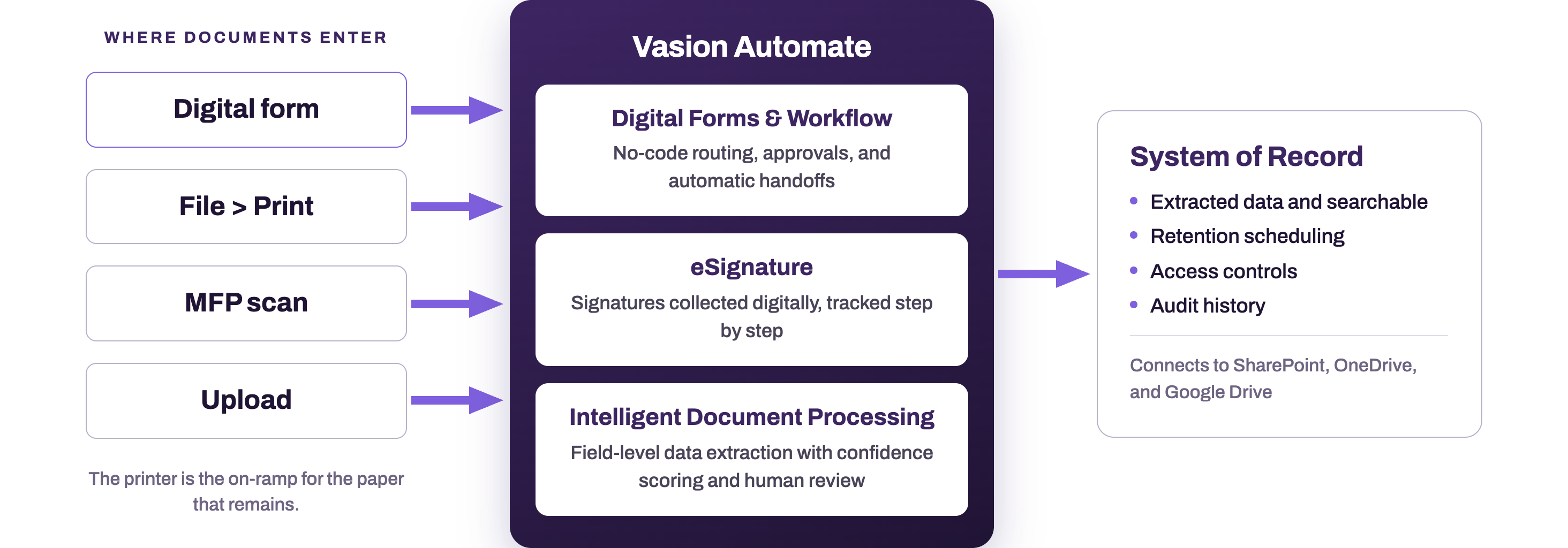
Vasion Automate collapses the five steps into one event. It is the document automation product on the Vasion Platform, the same cloud-native platform as PrinterLogic, and it treats every document entry point as a workflow trigger. Documents enter four ways: a digital form submission, the File > Print dialog, a scan at the MFP, or a direct upload.
For the scan-back loop, the digital form is the primary collapse. Forms are built with no-code drag and drop tools, so the process owner can build and revise them without waiting on a development queue. A submission arrives as structured data, not an image, and triggers its workflow automatically: routing to approvers, collecting eSignatures with a tracked audit trail, and filing the completed record without a human handoff. Where data must come out of a document itself, an Intelligent Document Processing (IDP) step extracts field-level data, scores its own confidence, and routes low-confidence results to a human review queue, so nothing enters a system of record unchecked.
The endpoint changes too. Completed documents land with extracted, searchable data in storage with configurable retention scheduling, folder-level protection for personally identifiable information, access controls, and audit history, with encryption in transit and at rest. Organizations with storage already in place can connect Vasion Automate to SharePoint, OneDrive, or Google Drive and keep filing where they file today.
What used to be five steps across several days is one submission and a workflow that reports its own status.
The results are measurable, and we proved them on ourselves. Vasion's own offer letter and onboarding process once ran across five systems: Workable, Google Forms, Adobe PDF, Gmail, and DocuSign. As our own case study shows, rebuilding that process in Vasion Automate cut HR processing time 50% while the workforce grew 200%, consolidated those five systems into one platform, and saved an estimated $25,000 a year in labor.
The Printer Is the On-Ramp for the Paper That Remains
Digitizing forms does not make paper vanish. Signed originals arrive by mail, regulated documents circulate as hard copy, and walk-in customers hand pages across a counter. The design question is not how to eliminate that paper but how quickly it enters the digital process.
This is where the print infrastructure earns a new job. Because PrinterLogic and Vasion Automate share a platform, the devices IT already manages become capture points. From the File > Print dialog, a document can route into a preconfigured workflow, go out for eSignature, or archive automatically: the same keystrokes every user already knows, delivered through the print client already deployed. At the MFP, a scan routes directly into a workflow or a storage folder instead of an inbox, so the document arrives with data extracted and in process rather than as an anonymous attachment.
For those documents the loop still exists, but it is one step long, and it is monitored.
Start with One Form
Attacking the loop does not require a digitization program; it requires one form. Pick the highest-volume document in your organization that gets printed only to be signed and scanned: an onboarding packet, a consent form, a purchase approval. Count its five steps and its elapsed days. Then rebuild it once as a digital form with eSignature in Vasion Automate, and let the MFPs you already manage catch whatever paper remains.