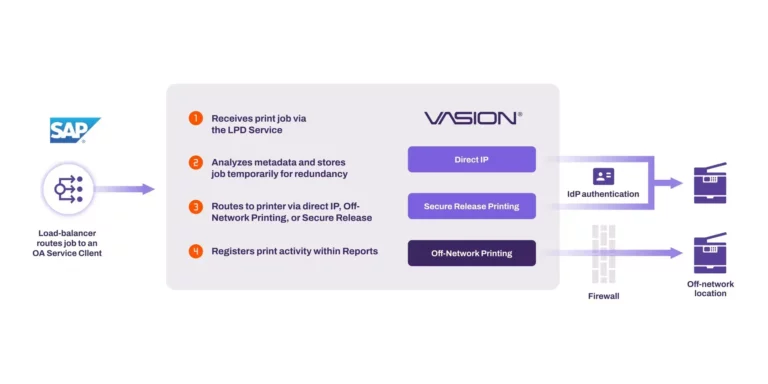
The typical method of printing from SAP is through a print server—often Windows print servers. On the back end, SAPWIN hands an initiated job to a print server running SAPSprint, which then processes and delivers to a standalone SAP print queue to finally be printed.
Windows print servers may do the job of managing the high volumes of printing from your SAP environment, but what happens when hardware fails and halts printing? Microsoft deprecated print spooler clustering in Windows Server 2012 and instead, to maintain redundancy, put their print servers behind a load balancer to split print traffic. Unfortunately, when a print job has already been received or a print queue has an error, those jobs won’t print and often the load balancer won’t detect the failure.
Connection interruptions and hardware failures aside, print servers in complex print and output webs require continued maintenance by trained IT professionals which fills up daily schedules. We’ve spoken to admins like you who struggle with the demand of managing complex print server environments. We recommend:
Reducing print server hardware
Consolidating front- and back-end printing
Adopting Zero Trust values
If you’re asking yourself, “Is this even possible?”, we have the answer, and PrinterLogic has the solution you’re looking for.